Christy Lynn
A Bitcoin wallet doesn’t actually hold your coins. It holds the private keys that prove you own them on the Bitcoin network. Whoever controls those keys controls the Bitcoin, which is why choosing the right wallet is the most important security decision you’ll make. We compared the leading hardware and software wallets on security, ease of use, Bitcoin features and price. Here are the best Bitcoin wallets for 2026.
Quick answer: The best Bitcoin wallet for most people is the Trezor Safe 5 ($129), a hardware wallet with open-source firmware, a secure element and a color touchscreen, also sold in a Bitcoin-only edition. The Ledger Nano X ($99) is best if you use an iPhone, the BitBox02 Nova is the best Bitcoin-only option, and the Trezor Safe 3 ($59) is the best budget pick. For free software wallets, Sparrow is best on desktop and BlueWallet is best on mobile. Keep large amounts in a hardware wallet and only spending money in a phone wallet.
Trezor Safe 5: best Bitcoin wallet overall
- Open-source firmware with a secure element
- Color touchscreen to verify every address
- Bitcoin-only edition available
$129 at the official Trezor store. Affiliate link. Read our Trezor Safe 5 review
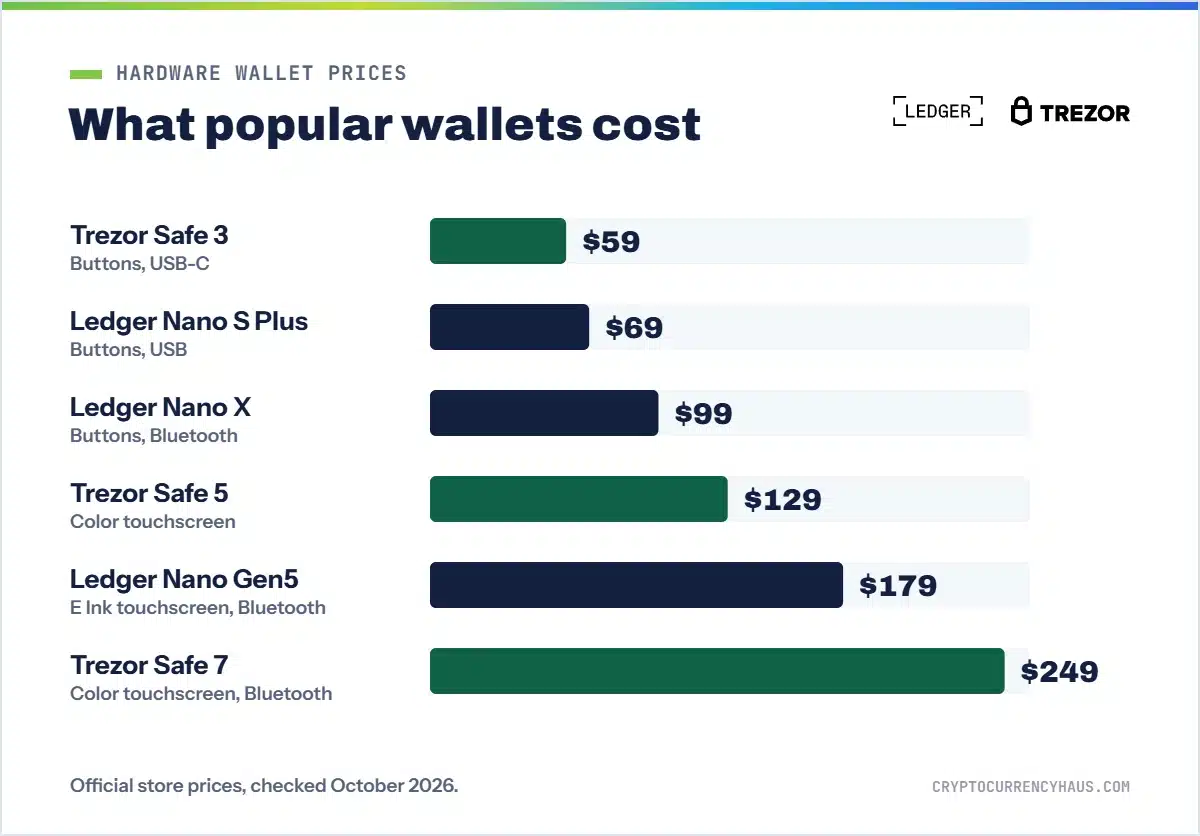
Prices were checked on each maker’s official store in October 2026 and change with sales and exchange rates.
Best Bitcoin wallets compared
| Wallet | Best for | Highlights | |
|---|---|---|---|
| Trezor Safe 5 Best overall | Most Bitcoin holders | $129, open source, touchscreen, Bitcoin-only edition | Shop Trezor |
| Ledger Nano X Best for iPhone | Mobile users | $99, Bluetooth, works fully with iPhone | Shop Ledger |
| BitBox02 Nova Best Bitcoin-only | Bitcoin purists | About $196, Swiss-made, iPhone over Bluetooth | Shop BitBox |
| Trezor Safe 3 Best budget | First hardware wallet | $59, open source, secure element | Shop Trezor |
| Wallet | Type | Price | Open source | Phone support |
|---|---|---|---|---|
| Trezor Safe 5 | Hardware | $129 | Yes | Android; limited on iPhone |
| Ledger Nano X | Hardware | $99 | Partly | iPhone and Android (Bluetooth) |
| BitBox02 Nova | Hardware | About $196 | Yes | iPhone (Bluetooth) and Android |
| Trezor Safe 3 | Hardware | $59 | Yes | Android; limited on iPhone |
| Sparrow Wallet | Desktop software | Free | Yes | Desktop only |
| BlueWallet | Mobile software | Free | Yes | iPhone and Android |
| Exodus | Desktop and mobile software | Free | Partly | iPhone and Android |
Hardware vs software Bitcoin wallets
There are three ways to hold Bitcoin, and most people end up using more than one:
- Hardware wallets (cold storage): small devices that keep your keys offline and make you approve each transaction on the device. They’re the safest option for savings and cost from $59 to about $400.
- Software wallets (hot wallets): free apps on your phone or computer. Your keys are stored on an internet-connected device, so they’re convenient for spending but riskier for large amounts.
- Exchange accounts (custodial): when you leave Bitcoin on an exchange such as Coinbase, the company holds your keys. That’s convenient for buying, but if the exchange is hacked or freezes withdrawals, you could lose access. As Bitcoiners say, “not your keys, not your coins.”
A good rule of thumb: if losing the amount would hurt, put it on a hardware wallet. Learn more in our guide to cryptocurrency wallets.
Best Bitcoin hardware wallets
1. Trezor Safe 5: best overall
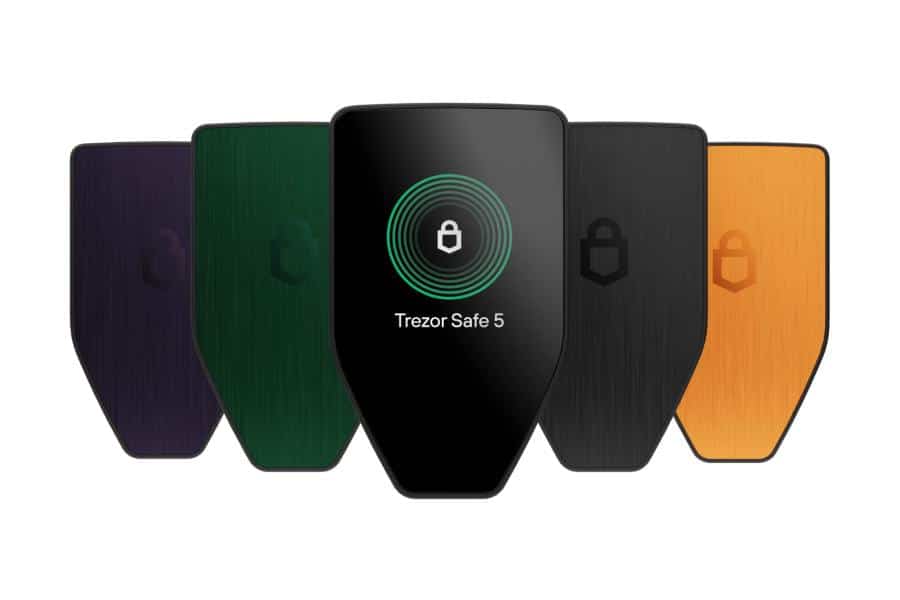
Trezor built the first Bitcoin hardware wallet in 2014, and the Safe 5 is its best all-rounder. Its 1.54-inch color touchscreen makes it easy to check the receiving address and amount before you approve, and its firmware is fully open source, which matters to many Bitcoiners. It pairs well with Sparrow Wallet for advanced Bitcoin features, and a Bitcoin-only edition strips out altcoin code to reduce the attack surface.
- Pros: open-source firmware, EAL6+ secure element, color touchscreen, multi-share backups, coin control and Tor in Trezor Suite.
- Cons: no Bluetooth, and on iPhone you can only check balances and receive.
2. Ledger Nano X: best for iPhone users
The Nano X connects to the Ledger Wallet app over Bluetooth, so you can send Bitcoin from an iPhone or Android phone without a cable. It’s now $99 and also supports thousands of other coins if you hold more than Bitcoin. The trade-offs are a small two-button screen and partly closed-source firmware.
- Pros: full iPhone support, secure element, low price, huge coin support.
- Cons: small screen, closed-source secure element firmware, past Ledger controversies.
3. BitBox02 Nova: best Bitcoin-only wallet
Swiss-made BitBox wallets are a favorite among Bitcoin purists. The new BitBox02 Nova adds a scratch-resistant glass display, a certified EAL6+ secure chip and Bluetooth for iPhone and iPad. Like its predecessor, it comes in a Bitcoin-only edition, uses fully open-source firmware and backs up to a microSD card as well as recovery words. The original BitBox02, at about $167, remains a strong choice for desktop and Android users. Read our full BitBox02 review.
- Pros: Bitcoin-only edition, open source, iPhone support, simple microSD backup, minimalist design.
- Cons: pricier than Trezor and Ledger, smaller brand in the US.
4. Trezor Safe 3: best budget Bitcoin wallet
At $59, the Safe 3 gives you the same open-source firmware and a secure element as Trezor’s pricier models. Its small monochrome screen and two buttons are slower to use, but it’s an excellent first hardware wallet if you want to move Bitcoin off an exchange without spending much. A Bitcoin-only edition is available.
- Pros: low price, open source, secure element, Bitcoin-only option.
- Cons: small screen, USB-C only, limited iPhone support.
Best free Bitcoin software wallets
5. Sparrow Wallet: best desktop Bitcoin wallet
Sparrow is a free, open-source, Bitcoin-only wallet for Windows, macOS and Linux. It gives you fine control over your transactions, including coin control, custom fees and multisig, and it works with hardware wallets from Trezor, Ledger and BitBox. You can also connect it to your own Bitcoin node for maximum privacy. It’s more technical than a beginner app, but it’s the best desktop companion for a hardware wallet.
- Pros: free, open source, Bitcoin-only, multisig, works with hardware wallets.
- Cons: desktop only, steeper learning curve.
6. BlueWallet: best mobile Bitcoin wallet
BlueWallet is a free, open-source Bitcoin wallet for iPhone and Android. It’s simple enough for beginners but includes advanced features such as watch-only wallets, which let you monitor your hardware wallet balance from your phone, and multisig vaults. It’s a good choice for spending money you carry with you.
- Pros: free, open source, easy to use, watch-only and multisig options.
- Cons: it’s a hot wallet, so keep only spending money in it.
7. Exodus: best for beginners who hold other coins
Exodus is a polished desktop and mobile wallet that supports Bitcoin plus many other cryptocurrencies, with built-in swaps and a portfolio view. It’s one of the friendliest wallets for newcomers and can pair with a Trezor for extra security. Parts of its code aren’t open source, and in-app swaps carry a spread. Read is Exodus wallet safe?
- Pros: beautiful, beginner-friendly design, multi-coin support, Trezor integration.
- Cons: partly closed source, swap fees built into the price.
How to choose a Bitcoin wallet
- How much you hold: for anything you can’t afford to lose, use a hardware wallet. A phone wallet is fine for small spending amounts.
- Your phone: if you mainly use an iPhone, choose the Ledger Nano X or BitBox02 Nova for full mobile support.
- Bitcoin-only or multi-coin: Bitcoin-only firmware has less code and a smaller attack surface. If you also hold other coins, choose a universal edition.
- Open source: Trezor, BitBox, Sparrow and BlueWallet publish their code so independent experts can verify it.
- Screen and backup: a larger screen makes checking addresses easier, and multi-share backups protect larger holdings.
How to set up a Bitcoin wallet safely
- Buy a hardware wallet only from the official store or an authorized reseller.
- Download the companion app only from the maker’s official website or app store.
- Create a new wallet on the device and write down the recovery words it shows you, on paper or a metal backup.
- Store your recovery words offline, somewhere private and safe from fire and water. Never photograph them or type them into a computer or phone.
- Send a small test amount from your exchange, confirm it arrives, then move the rest.
Your recovery words are the master key to your Bitcoin. Anyone asking for them, including “support” staff, is a scammer. See our guide to Bitcoin scams. Prefer to start with a free wallet? Follow our guide to creating a free Bitcoin wallet.
Where to buy Bitcoin
Wallets store Bitcoin, but you’ll usually buy it on an exchange first and then withdraw it. Coinbase is the easiest place for beginners, and Kraken is one of the cheapest through Kraken Pro. See our step-by-step guide on how to buy Bitcoin and the best crypto exchanges.
How we chose the best Bitcoin wallets
We compared each wallet’s security model, open-source status, Bitcoin features, phone support, backup options, track record and official pricing. Partners can’t pay for our rankings. Read our review process.
The bottom line
For most people, the Trezor Safe 5 is the best Bitcoin wallet: it’s secure, open source, easy to verify and fairly priced. Choose the Ledger Nano X if you live on your iPhone, the BitBox02 Nova if you want a premium Bitcoin-only device, or the Trezor Safe 3 to start on a budget. Pair your hardware wallet with Sparrow on desktop or BlueWallet as a watch-only wallet on your phone, and keep your recovery words offline.
Trezor Safe 5: best Bitcoin wallet overall
- Open-source firmware with a secure element
- Color touchscreen to verify every address
- Bitcoin-only edition available
$129 at the official Trezor store. Affiliate link. Read our Trezor Safe 5 review
Frequently asked questions
What is the safest Bitcoin wallet?
A hardware wallet such as the Trezor Safe 5, Ledger Nano X or BitBox02 Nova is the safest way to store Bitcoin, because your keys stay offline and every transaction must be approved on the device.
What is the best free Bitcoin wallet?
Sparrow Wallet is the best free desktop wallet and BlueWallet is the best free mobile wallet. Both are open source.
Do I need a Bitcoin-only wallet?
No, but Bitcoin-only firmware has less code and a smaller attack surface. If you only hold Bitcoin, it’s a sensible choice.
Is it safe to keep Bitcoin on Coinbase?
Coinbase is a regulated company, but it holds your keys. For long-term savings, move your Bitcoin to a wallet you control.
What happens if I lose my hardware wallet?
Your Bitcoin is safe as long as you have your recovery words. Restore them on a new device to regain access.
Can I use one wallet for Bitcoin and other coins?
Yes. Universal editions of Trezor, Ledger and BitBox and apps like Exodus support Bitcoin plus many other coins.
How much does a Bitcoin hardware wallet cost?
Good options start at $59 for the Trezor Safe 3. The Ledger Nano X costs $99, the Trezor Safe 5 $129, and premium touchscreen models run from about $179 to $399.