Christy Lynn
The BitBox02 is a small, Swiss-made hardware wallet with a reputation for strong security and simple design. It’s a favorite among Bitcoin holders thanks to its open-source firmware and Bitcoin-only edition, and the newer BitBox02 Nova adds iPhone support and a certified secure chip. Our BitBox02 review covers both models, security, backups, coin support, the drawbacks and who should buy one in 2026.
Quick answer: The BitBox02 is an excellent hardware wallet, especially for Bitcoin holders who value open-source code and a simple setup. The new BitBox02 Nova (about $196) is the one to buy: it adds Bluetooth for iPhone and iPad, an EAL6+ certified secure chip and a tougher glass display, while keeping BitBox’s microSD backup and Bitcoin-only option. It supports fewer coins than Ledger or Trezor and costs more, so if you hold many altcoins choose a Ledger Nano X, and if price matters most consider the Trezor Safe 5.

BitBox02 Nova: our verdict
- Fully open-source, Swiss-made
- Works with iPhone over Bluetooth
- Bitcoin-only edition available
About $196 for the Nova and $167 for the original BitBox02 at the official store. Affiliate link.
Prices and specs were checked on BitBox’s official website and shop in October 2026. Prices in US dollars can vary with exchange rates.
BitBox02 at a glance
| BitBox02 Nova | BitBox02 | |
|---|---|---|
| Price | About $196 | About $167 |
| Editions | Multi or Bitcoin-only | Multi or Bitcoin-only |
| Secure chip | EAL6+ certified (Infineon OPTIGA Trust M V3), dual-chip design | Secure chip, dual-chip design |
| Firmware | Fully open source | Fully open source |
| Display | 128 x 64 OLED with glass top | 128 x 64 OLED |
| Input | Capacitive touch sensors | Capacitive touch sensors |
| Connection | USB-C and Bluetooth Low Energy | USB-C |
| Phone support | iPhone, iPad and Android | Android |
| Backup | microSD card, optional recovery words | microSD card, optional recovery words |
| Colors | Midnight Black, Polar White, Bitcoin Orange | Black |
| Weight | 13 g | 12 g |
Our verdict
What we like
- Fully open-source firmware, independently audited
- Bitcoin-only edition with a smaller attack surface
- Easy microSD backup plus optional recovery words
- iPhone support on the Nova via Bluetooth
- Tiny, discreet design made in Switzerland
What could be better
- Fewer supported coins than Ledger or Trezor
- Small screen compared with touchscreen rivals
- Pricier than the Ledger Nano X or Trezor Safe 5
- Smaller brand and fewer retail options in the US
BitBox02 Nova vs the original BitBox02
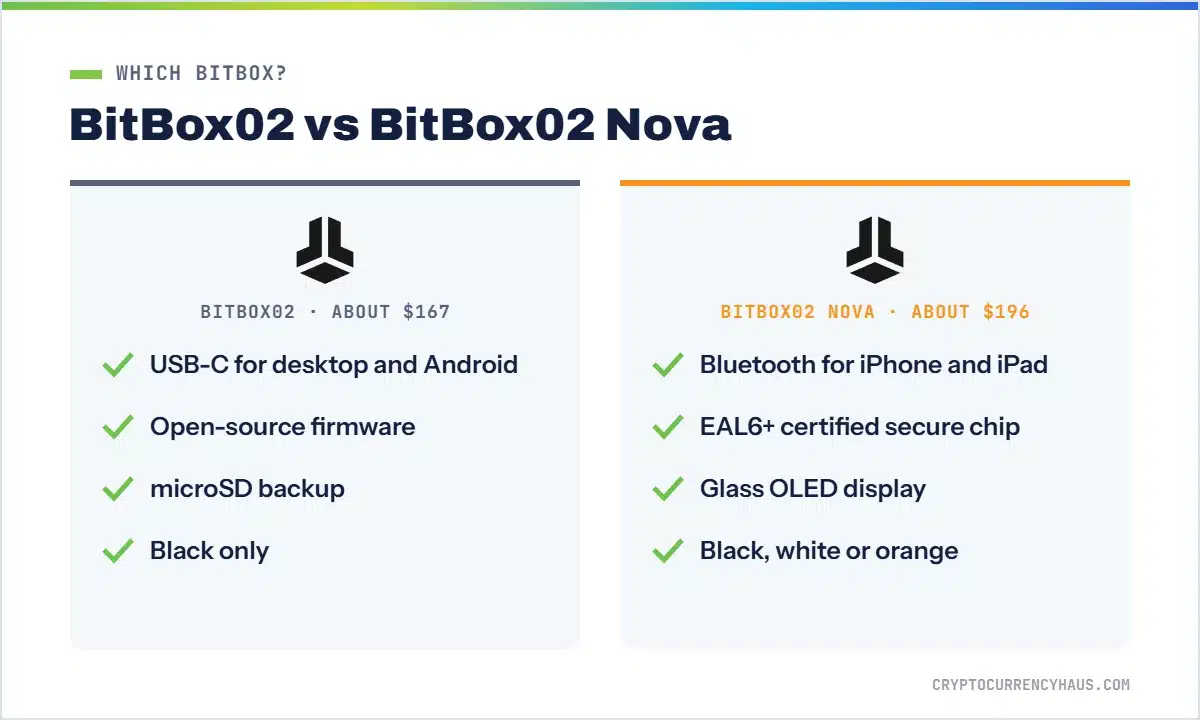
The Nova is an upgrade rather than a redesign. It keeps the same size, touch sensors and backup system, and adds three meaningful improvements:
- iPhone and iPad support: the original BitBox02 works with Android and desktops only. The Nova adds Bluetooth so it can connect to the BitBoxApp on iOS.
- A certified secure chip: the Nova uses an EAL6+ certified Infineon OPTIGA Trust M V3 secure chip, which BitBox notes is NDA-free.
- A glass display: the tempered glass top is more scratch resistant and easier to read.
It also comes in white and orange as well as black. Unless you only ever use a desktop or an Android phone, the Nova is worth the extra money.
Design and setup
The BitBox02 is one of the smallest hardware wallets available, about the size of a USB stick, and plugs straight into a USB-C port. It ships with USB-A and Lightning adapters and an extension cable. Instead of buttons, you tap, slide and hold capacitive sensors on the top and bottom edges, which feels natural after a few minutes.
Setup happens in the free BitBoxApp for Windows, macOS, Linux, Android and, with the Nova, iOS. You name the device, set a device password on the BitBox itself, and create a backup on the included microSD card. You can also write down your 24 recovery words. The whole process takes about 10 minutes.
Security
Security is where BitBox shines. Its dual-chip design pairs a main microcontroller with a separate secure chip that protects your keys against physical attacks, while the firmware stays fully open source, so anyone can review the code. BitBox’s code has been independently audited, and the company runs a bug bounty program.
- On-device confirmation: you check every address and amount on the BitBox screen before approving.
- Device password: entered on the device itself, never on your computer.
- Optional passphrase for a hidden wallet.
- Anti-klepto protection: BitBox uses an anti-exfiltration protocol for Bitcoin signing to guard against a compromised device leaking your keys.
- Bitcoin-only firmware: removes all altcoin code for the smallest possible attack surface.
BitBox will never call you or ask for your recovery words. Anyone who does is a scammer. Learn the warning signs in our guide to crypto scams.
Backup and recovery
BitBox’s microSD backup is one of its most beginner-friendly features. During setup, the device writes your wallet backup to the card, which you then store somewhere safe. Treat the card like your recovery words: anyone who has it can restore your wallet. If you lose your BitBox, you can restore your wallet on a new one from the card. You can also display and write down the standard 24 recovery words, which let you restore on any compatible wallet. We recommend doing both and storing them in different places.
Coin support and the BitBoxApp
The Bitcoin-only edition supports just Bitcoin, including advanced features such as multisig with apps like Sparrow. The Multi edition supports Bitcoin, Litecoin, Ethereum, Cardano and more than 1,500 ERC-20 tokens, and connects to Ethereum apps through WalletConnect. That’s far fewer assets than Ledger, which supports 15,000+, so check your coins first. There’s no native support for Solana or XRP, for example.
The BitBoxApp is clean and simple. It lets you send and receive, buy and sell through partners, view your portfolio and connect to third-party wallets. BitBox has also introduced Lightning payments in the BitBoxApp for fast, low-cost bitcoin transfers.
BitBox02 vs Ledger vs Trezor
| Wallet | Best for | Highlights | |
|---|---|---|---|
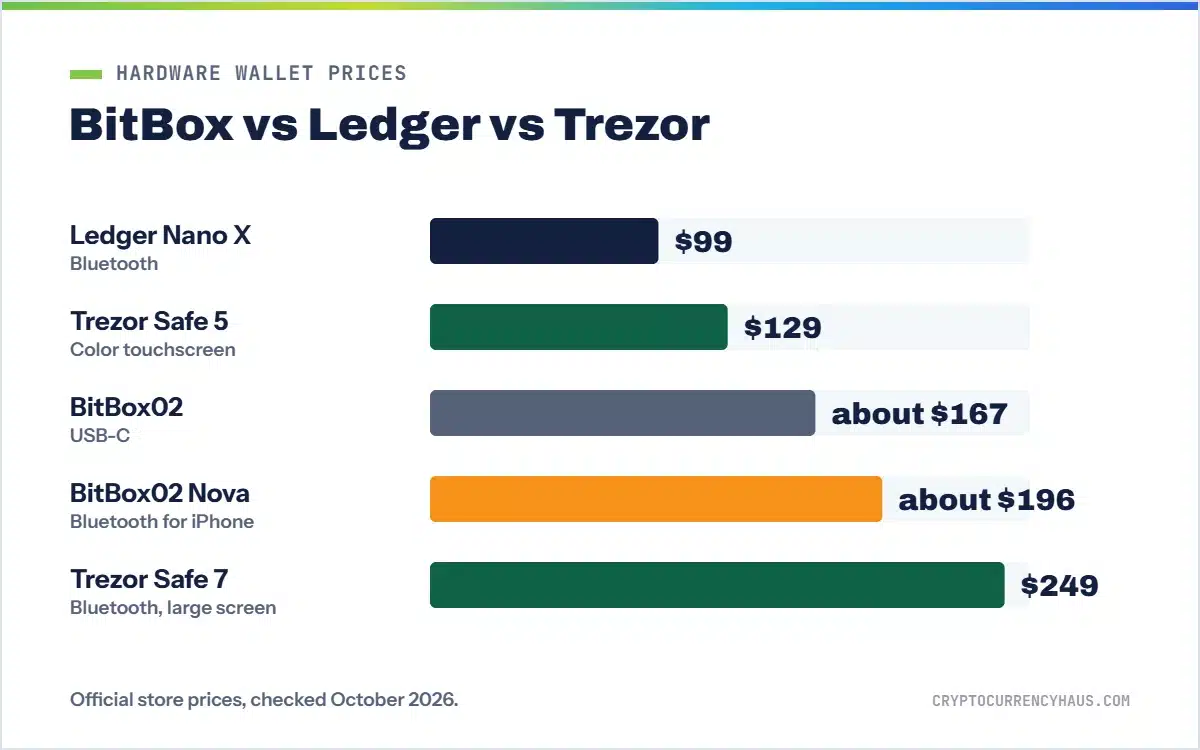
| BitBox02 Nova Best Bitcoin-only | Bitcoin holders | About $196, open source, iPhone over Bluetooth, microSD backup | Shop BitBox |
| Trezor Safe 5 Best open-source value | Desktop and Android users | $129, color touchscreen, EAL6+ secure element | Shop Trezor |
| Ledger Nano X Best for altcoins | Mobile users with many coins | $99, Bluetooth, 15,000+ coins and tokens | Shop Ledger |
All three are secure. Choose BitBox for a minimalist, open-source Bitcoin wallet that works on iPhone; Trezor for open source with a bigger touchscreen at a lower price; and Ledger for the widest coin support. See every option in the best Bitcoin wallets and best hardware wallets.
How to buy a BitBox02 safely
- Buy from the official BitBox shop or an authorized reseller listed on BitBox’s website.
- Check the packaging and never use a device that comes with a backup or recovery words already set up.
- Download the BitBoxApp only from bitbox.swiss or your phone’s official app store.
- Create your microSD backup and write down your recovery words, then store them separately.
- Send a small test transaction before moving larger amounts.
The bottom line
The BitBox02 Nova is one of the best hardware wallets for Bitcoin holders: open source, Swiss-made, easy to back up and now usable on iPhone. It costs more than the Ledger Nano X and Trezor Safe 5 and supports fewer coins, so it’s best if you mainly hold Bitcoin or a handful of major assets. If that’s you, it’s a superb choice.
BitBox02 Nova: our verdict
- Fully open-source, Swiss-made
- Works with iPhone over Bluetooth
- Bitcoin-only edition available
About $196 for the Nova and $167 for the original BitBox02 at the official store. Affiliate link.

Trezor Safe 5: open source with a color touchscreen
- 1.54-inch color touchscreen
- EAL6+ secure element
- $129 at the official store
Affiliate link. Read our Trezor Safe 5 review
Frequently asked questions
Is the BitBox02 safe?
Yes. It combines a secure chip with fully open-source, audited firmware, on-device confirmation and password protection. Keep your microSD backup and recovery words offline and private.
What is the difference between the BitBox02 and BitBox02 Nova?
The Nova adds Bluetooth for iPhone and iPad, an EAL6+ certified secure chip, a glass display and more colors. Both have open-source firmware and microSD backups.
How much does the BitBox02 cost?
About $196 for the BitBox02 Nova and about $167 for the original BitBox02 at the official shop, depending on exchange rates.
Does the BitBox02 work with iPhone?
The BitBox02 Nova does, over Bluetooth. The original BitBox02 works with Android and desktop computers only.
Should I get the Bitcoin-only edition?
If you only hold bitcoin, yes. The Bitcoin-only firmware removes all altcoin code, reducing the attack surface.
What coins does the BitBox02 support?
The Multi edition supports Bitcoin, Litecoin, Ethereum, Cardano and 1,500+ ERC-20 tokens. It doesn’t support Solana or XRP.
What happens if I lose my BitBox02?
Restore your wallet on a new BitBox using your microSD backup, or on any compatible wallet using your 24 recovery words.
How we reviewed the BitBox02
We compared BitBox’s published specifications, pricing, security documentation and app features against other leading hardware wallets. Partners can’t pay for our ratings. Read our review process.