Christy Lynn
If you hold crypto you can’t afford to lose, a hardware wallet is the single best upgrade you can make. It keeps your private keys on a small offline device, so a hacked computer, phishing site or failed exchange can’t touch your coins. We compared the leading Ledger, Trezor and BitBox devices on security, coin support, ease of use and price.
Quick answer: The best crypto hardware wallet for most people is the Ledger Nano X, thanks to Bluetooth, broad coin support and a secure element chip. The Trezor Safe 3 and Ledger Nano S Plus are the best budget picks, the Trezor Safe 5 is the best open-source touchscreen option, the Ledger Flex, Stax and Trezor Safe 7 are the best premium devices, and the BitBox02 suits minimalists and Bitcoin-only users.

Ledger Nano X: best overall hardware wallet
- Bluetooth for phone and desktop
- Supports thousands of coins and tokens
- Secure element chip
Buy only from the official store, never used or from marketplaces. Affiliate link.
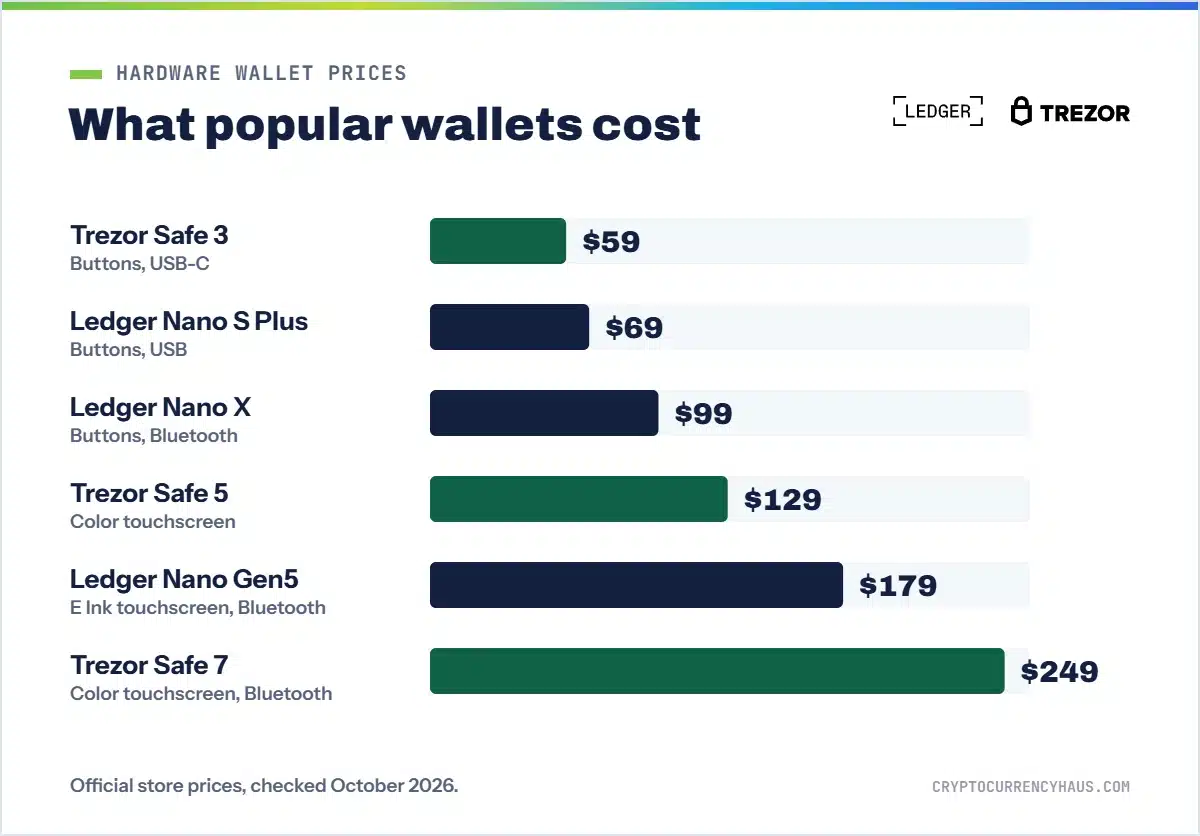
Hardware wallet prices change often and sales are common, so we group devices by price range. Always buy from the official store or an authorized reseller.
Best hardware wallets at a glance
| Wallet | Best for | Price range and highlights | |
|---|---|---|---|
| Ledger Nano X Best overall | Most investors | $99. Bluetooth, thousands of coins, secure element | Shop Ledger |
| Trezor Safe 3 | Budget, open source | $59. Open-source firmware, EAL6+ secure element | Shop Trezor |
| Ledger Nano S Plus | Budget, wide coin support | $69. Same Ledger app and coin support as the Nano X | Shop Ledger |
| Trezor Safe 5 | Open source with a touchscreen | $129. Color touchscreen, haptics, secure element | Shop Trezor |
| Ledger Flex, Stax, Nano Gen5 | Premium, easy to read | About $179 to $399. E Ink touchscreens, Bluetooth and NFC | Shop Ledger |
| Trezor Safe 7 | Premium open source | About $249. Large color screen, Bluetooth, water and dust resistance | Shop Trezor |
| BitBox02 | Minimalists, Bitcoin-only | Swiss-made, open source, Bitcoin-only edition | Shop BitBox |
Why you need a hardware wallet
When you leave crypto on an exchange, the exchange holds the keys. If it is hacked, freezes withdrawals or fails, as FTX did in 2022, your funds can be stuck or lost. A software wallet on your phone or computer gives you the keys, but those devices are online and exposed to malware and phishing.
A hardware wallet signs transactions inside the device, so your private keys never touch the internet. Even if your computer is compromised, an attacker can’t move your crypto without the physical device and your PIN, and you confirm every transaction on the device’s own screen.
The best crypto hardware wallets in 2026
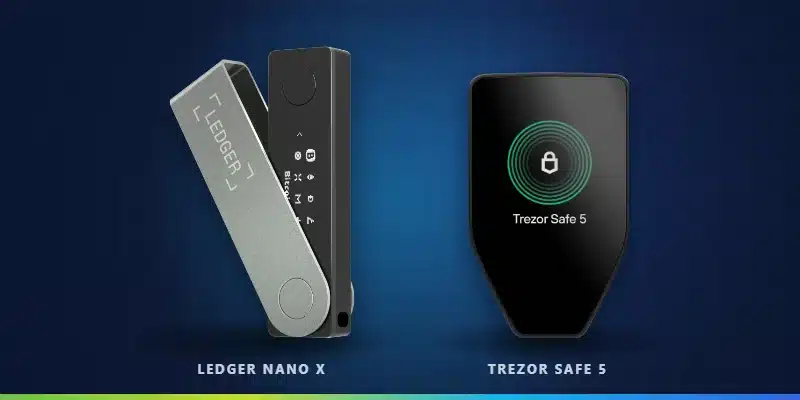
1. Ledger Nano X: best overall
Ledger’s most popular wallet connects to the Ledger Wallet app (formerly Ledger Live) on desktop or mobile by USB-C or Bluetooth, and supports thousands of coins and tokens, including Bitcoin, Ethereum, Solana and XRP. Its secure element chip is the same type of chip used in passports and payment cards. Read our full Ledger Nano X review.
- Price: $99 at the official store (previously $149)
- Best for: investors who hold several coins and want to manage them from a phone
- Watch out for: Ledger’s firmware isn’t fully open source
2. Trezor Safe 3: best budget wallet
Trezor’s entry-level device pairs fully open-source firmware with an EAL6+ certified secure element and a simple two-button design. It’s an excellent first hardware wallet if transparency matters to you.
- Price: $59
- Best for: beginners on a budget who want open-source security
- Watch out for: small screen and no Bluetooth
3. Ledger Nano S Plus: best budget Ledger
The Nano S Plus gives you Ledger’s security and coin support at a lower price than the Nano X, with a compact screen and plenty of app storage. It’s ideal if you mostly manage your crypto from a computer.
- Price: $69
- Best for: budget buyers who want Ledger’s wide coin support
4. Trezor Safe 5: best open-source touchscreen
The Safe 5 adds a color touchscreen and haptic feedback to Trezor’s open-source security, which makes checking addresses and approving transactions much easier. Read our full Trezor Safe 5 review.
- Price: $129
- Best for: people who want open source plus a modern touchscreen
5. Ledger Flex, Ledger Stax, Nano Gen5 and Trezor Safe 7: best premium wallets
Ledger’s premium devices use E Ink touchscreens that make reviewing transactions far easier: the Nano Gen5 (about $179) has a 2.8-inch screen, the Flex (about $249) a sharper 2.8-inch display and the Stax (about $399) a curved 3.7-inch screen with wireless charging. All three add Bluetooth and NFC. Trezor’s Safe 7 (about $249) adds a 2.5-inch color screen, Bluetooth, a new TROPIC01 secure chip and water and dust resistance.
- Best for: larger portfolios and anyone who wants the clearest screen
6. BitBox02: best minimalist wallet
Made in Switzerland, the BitBox02 offers open-source firmware, a discreet design, microSD backups and a Bitcoin-only edition for maximum simplicity. The newer BitBox02 Nova adds a glass display, a certified EAL6+ secure chip and Bluetooth for iPhone. Read our full BitBox02 review or see more options in the best Bitcoin wallets.
- Best for: Bitcoin-focused users who want a simple, auditable device
Ledger vs Trezor: which should you choose?
| Ledger | Trezor | |
|---|---|---|
| Firmware | Partly closed source | Fully open source |
| Coin support | Widest (thousands of coins and tokens) | All major coins, slightly fewer tokens |
| Mobile | Bluetooth on Nano X, Gen5, Flex and Stax | Bluetooth on Safe 7 |
| Budget pick | Nano S Plus | Safe 3 |
| Premium pick | Flex or Stax | Safe 7 |
Choose Ledger for the widest coin support and the best mobile experience. Choose Trezor if you prefer fully open-source firmware and a transparent security model. Both are reputable. Ledger faced criticism in 2023 over its optional Ledger Recover seed backup service, and a 2020 customer-data leak led to phishing attempts against Ledger customers.
How to set up a hardware wallet safely
- Buy from the official store or an authorized reseller. Never buy used or from marketplace sellers.
- Check the packaging and make sure the device isn’t pre-configured. A real device never comes with a recovery phrase already filled in.
- Install the official app (Ledger Wallet or Trezor Suite) from the maker’s website.
- Create a new wallet and write your 12- or 24-word recovery phrase on paper or a metal backup. Never type it into a computer or phone, and never photograph it.
- Send a small test amount from your exchange, confirm it arrives, then move the rest.
Not sure where to buy crypto first? See the best crypto exchanges.
Free alternatives: software wallets
If you’re not ready to buy a hardware wallet, a reputable free software wallet beats leaving large balances on an exchange:
- Exodus: a beginner-friendly multi-coin wallet for desktop and mobile. See is Exodus safe.
- MetaMask and Coinbase Wallet: best for Ethereum and DeFi. See MetaMask vs Coinbase Wallet.
- Phantom and Solflare: best for Solana. See the best Solana wallets.
Software wallets are “hot” wallets connected to the internet, so they’re less secure than hardware for large amounts. Many people use both, connecting a Ledger or Trezor to MetaMask for DeFi.
Are hardware wallets safe?
Yes, as long as you buy directly from the manufacturer, set up the device yourself and never share your recovery phrase. Avoid these common mistakes:
- Buying a used or pre-configured device
- Typing your recovery phrase into a website, app or “support” chat
- Approving transactions without checking the address on the device’s screen
- Signing unknown token approvals on DeFi sites
Learn more in our guide to crypto scams.
The bottom line
The Ledger Nano X is the best hardware wallet for most people. On a budget, choose the Trezor Safe 3 or Ledger Nano S Plus. If open-source firmware matters to you, the Trezor Safe 5 is the best all-rounder, and the Ledger Flex or Trezor Safe 7 are worth it for large portfolios.

Trezor Safe 5: touchscreen and open source
- Open-source firmware
- Color touchscreen with haptics
- EAL6+ secure element
Buy only from the official Trezor store. Affiliate link.
Frequently asked questions
What is the best hardware wallet?
The Ledger Nano X is the best for most people. The Trezor Safe 3 and Ledger Nano S Plus are the best budget options, and the Trezor Safe 5 is the best open-source touchscreen wallet.
Do I need a hardware wallet?
If you hold more crypto than you’d be comfortable losing, yes. It removes the risk of an exchange failure or a hacked computer.
What happens if I lose my hardware wallet?
You can restore your funds on a new device using your recovery phrase. That’s why storing the phrase safely is so important.
Can a hardware wallet be hacked?
Remote hacks are extremely rare. Most losses come from phishing, fake devices or exposed recovery phrases.
Is Ledger or Trezor better?
Ledger has wider coin support and better mobile features. Trezor has fully open-source firmware. Both are reputable choices.
Which hardware wallet supports the most coins?
Ledger supports the broadest range of coins and tokens, though Trezor covers all the major ones.
How much does a hardware wallet cost?
Budget models cost under $100, mid-range models $100 to $200 and premium touchscreen models about $250 to $400.
Can I buy a hardware wallet on Amazon?
It’s safest to buy from the manufacturer’s official store. If you use a marketplace, buy only from the brand’s official storefront and never accept a used or opened device.
Can I use a hardware wallet with MetaMask?
Yes. Ledger and Trezor both connect to MetaMask, so you can use DeFi while your keys stay on the device.