Christy Lynn
The Trezor Safe 5 is Trezor’s mid-range hardware wallet, and it’s the one we recommend to most people who want Trezor’s open-source approach without paying for a premium model. It pairs a bright color touchscreen with a certified secure element chip, and at $129 it undercuts most touchscreen rivals. Our Trezor Safe 5 review covers security, ease of use, coin support, the drawbacks and who should buy it in 2026.
Quick answer: The Trezor Safe 5 is one of the best hardware wallets you can buy in 2026. For $129 you get a 1.54-inch color touchscreen with haptic feedback, a certified EAL6+ secure element and fully open-source firmware, which makes it our top pick for security-minded users who mostly manage crypto on a computer or Android phone. Its main limits are that it connects by USB-C only and offers only limited iPhone support. If you mainly use an iPhone, the Ledger Nano X or the Bluetooth Trezor Safe 7 is a better fit.

Trezor Safe 5: our verdict
- Fully open-source firmware
- 1.54-inch color touchscreen with haptics
- $129 at the official Trezor store
Buy only from the official Trezor store. Affiliate link.
Prices and specs were checked on the official Trezor website in October 2026. Trezor runs regular promotions, so confirm the current price before you buy.
Trezor Safe 5 at a glance
| Trezor Safe 5 | |
|---|---|
| Price | $129 at the official Trezor store |
| Screen | 1.54-inch color touchscreen, 240 x 240 pixels, Gorilla Glass 3 |
| Feedback | Trezor Touch haptic feedback |
| Security chip | Certified EAL6+ secure element |
| Firmware | Fully open source |
| Connection | USB-C (USB-C to USB-C cable included), microSD card slot |
| Phone support | Full support on Android; limited on iPhone (check balances, buy and receive) |
| Backup | 20-word backup by default; 12-, 20- and 24-word and Multi-share options |
| Editions | Universal (thousands of coins and tokens) or Bitcoin-only |
| Size and weight | 65.9 x 40 x 8 mm, 23 g |
Our verdict
What we like
- Bright color touchscreen that makes checking addresses easy
- Fully open-source firmware anyone can audit
- EAL6+ secure element plus PIN and passphrase protection
- Advanced Multi-share Backup for splitting your backup
- Good value at $129
What could be better
- No Bluetooth, so it’s USB-C only
- Limited iPhone support: you can’t send or swap from iOS
- Fewer supported tokens than Ledger
- Plastic body compared with premium metal wallets
Design and screen
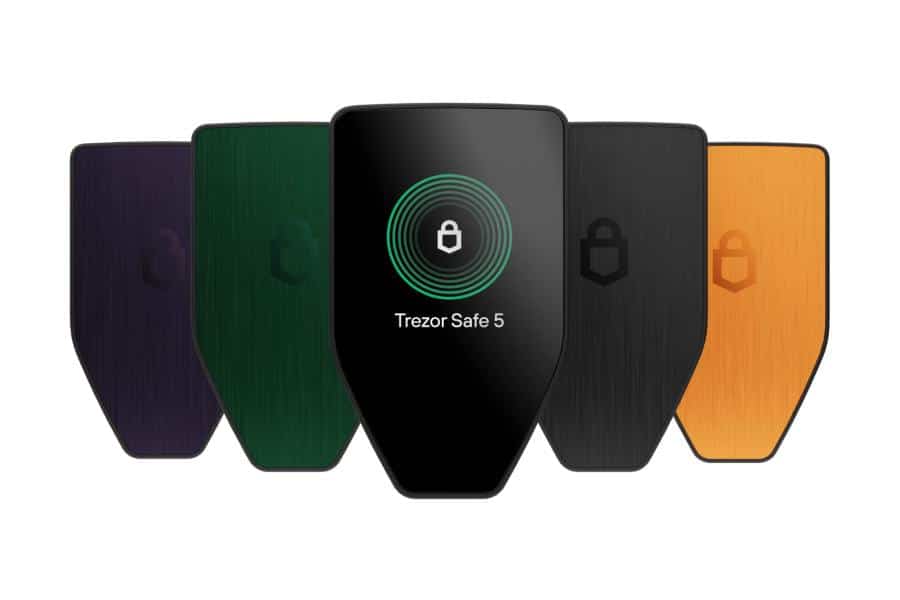
The Safe 5’s 1.54-inch color touchscreen is its standout feature. It’s protected by scratch-resistant Gorilla Glass 3, and every tap produces a small vibration, which Trezor calls Trezor Touch, so you know your input registered. Reading a full receiving address or the amount you’re about to send is far easier than on two-button wallets like the Ledger Nano X or Trezor Safe 3, and that clarity is a real security benefit: it helps you spot address-swapping malware before you approve a transaction.
The body is made of durable PC-ABS plastic with an aluminum backplate, it weighs just 23 grams, and it plugs into your computer or Android phone with a USB-C cable. There’s also a microSD card slot, which you can use to encrypt your PIN.
Security
Trezor pioneered the hardware wallet in 2014, and the Safe 5 builds on that track record with several layers of protection:
- Secure element: a certified EAL6+ chip protects your device against physical attacks, such as someone stealing it and trying to extract the keys.
- Open source: Trezor’s firmware and hardware design are public, so independent researchers can check exactly how it works.
- On-device confirmation: every transaction must be approved on the touchscreen, so malware on your computer can’t move your coins.
- PIN and passphrase: you enter both on the device itself, never on your computer, and a passphrase creates a separate hidden wallet.
- Privacy tools: Trezor Suite can route traffic through Tor and offers coin control for Bitcoin.
- Tamper-evident packaging: security seals on the box and device show whether it was opened.
This mix of a secure element with open-source code is why many security experts favor Trezor. Ledger also uses secure elements, but its chip firmware is closed source, so you have to place more trust in the company. See how the two compare in our Ledger vs Trezor guide.
Backup and recovery
By default, the Safe 5 creates a 20-word wallet backup using Trezor’s newer standard, and it also supports 12- and 24-word backups. Write your words on the included backup cards and store them somewhere safe and offline. If you lose the device or it breaks, you can restore your crypto on a new Trezor using those words.
For larger holdings, you can upgrade to an Advanced Multi-share Backup, which splits your backup into several shares, for example any 2 of 3, so a single lost or stolen share can’t expose or destroy your wallet. One thing to know: a 20-word backup works with Trezor and compatible wallets, but not every other brand supports it, so a replacement Trezor is the simplest way to recover.
Coins and Trezor Suite
The universal Safe 5 supports thousands of coins and tokens, including Bitcoin, Ethereum, Solana, Cardano, XRP, Litecoin, Dogecoin and stablecoins, plus Ethereum and Solana tokens. Ledger supports more assets overall, so check Trezor’s coin list if you hold smaller altcoins. A Bitcoin-only edition is also available for people who want the smallest possible attack surface.
You manage everything in Trezor Suite, Trezor’s free app for Windows, macOS, Linux and Android. It lets you send, receive, buy, sell, swap and stake coins such as Ethereum, Solana and Cardano, and track your portfolio. The Safe 5 also works with third-party wallets like MetaMask and Sparrow, so you can use DeFi apps or advanced Bitcoin tools while your keys stay on the device. It can even act as a FIDO2 security key for logging into websites.
Mobile and iPhone support
This is the Safe 5’s biggest limitation. On Android, you can plug it in by USB-C and use Trezor Suite fully. On iPhone, Trezor Suite only lets you check balances, buy and receive crypto; you can’t send, swap or set up the device from iOS. If you want to manage crypto from an iPhone, look at the Ledger Nano X, which connects by Bluetooth, or Trezor’s Bluetooth-enabled Safe 7.
Trezor Safe 5 vs Safe 3 vs Safe 7
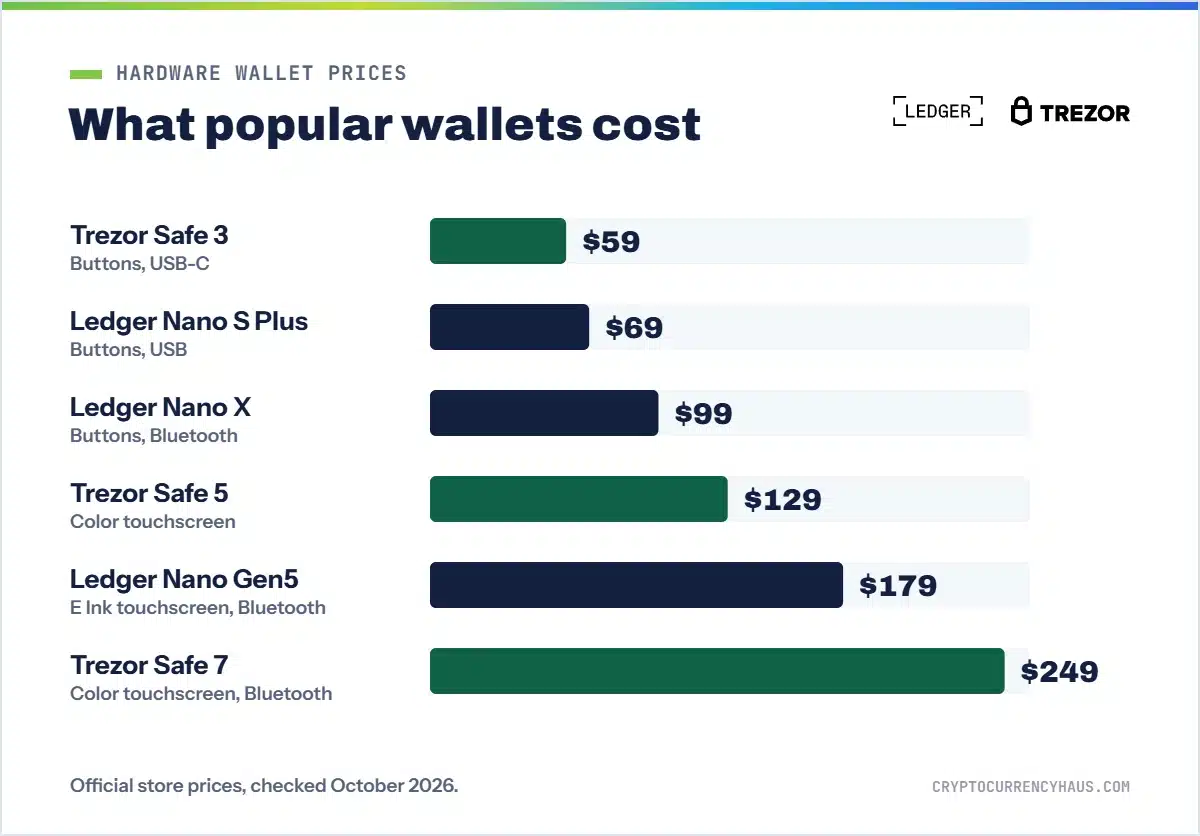
| Model | Price | Screen | Bluetooth | Best for |
|---|---|---|---|---|
| Trezor Safe 3 | $59 | 0.96-inch monochrome, two buttons | No | Beginners on a budget |
| Trezor Safe 5 | $129 | 1.54-inch color touchscreen | No | Most people, especially desktop and Android users |
| Trezor Safe 7 | $249 | 2.5-inch color touchscreen | Yes, with full iPhone support | iPhone users and larger portfolios |
The Safe 3 offers the same open-source firmware and a secure element for less than half the price, but its tiny two-button screen is slower to use. The Safe 7 adds Bluetooth, full iOS support, a larger screen, an aluminum body, IP54 dust and water resistance, wireless charging and Trezor’s new TROPIC01 secure chip. For most people, the Safe 5 is the best balance of features and price.
Trezor Safe 5 vs Ledger Nano X
| Wallet | Best for | Highlights | |
|---|---|---|---|
| Trezor Safe 5 Best open source | Desktop and Android users | $129, color touchscreen, open-source firmware | Shop Trezor |
| Ledger Nano X Best for mobile | iPhone users | $99, Bluetooth, 15,000+ coins and tokens | Shop Ledger |
| Trezor Safe 3 Best budget | First hardware wallet | $59, open source, secure element | Shop Trezor |
Choose the Safe 5 if you want the better screen and open-source firmware. Choose the Nano X if you mostly use an iPhone or hold lots of different tokens. Both are excellent and far safer than leaving crypto on an exchange.
How to buy and set up a Safe 5 safely
- Buy from the official Trezor store or an authorized reseller, never a used or open-box device.
- Check that the security seals are intact, then download Trezor Suite only from trezor.io.
- Install the firmware when prompted, create a new wallet and set a PIN on the device.
- Write your backup words on the included cards and store them offline in a safe place.
- Send a small test amount, confirm it arrives, then move the rest of your crypto off the exchange.
Trezor will never ask for your backup words by email, phone or social media. Learn to spot fake support and phishing in our guide to crypto scams.
The bottom line
The Trezor Safe 5 is the best open-source hardware wallet for most people. Its color touchscreen makes every transaction easy to verify, its secure element and open-source code give you strong, transparent security, and $129 is a fair price for what you get. Skip it only if you need full iPhone support, in which case the Ledger Nano X or Trezor Safe 7 makes more sense. See every option in the best hardware wallets.
Trezor Safe 5: our verdict
- Fully open-source firmware
- 1.54-inch color touchscreen with haptics
- $129 at the official Trezor store
Buy only from the official Trezor store. Affiliate link.

Ledger Nano X: best for mobile
- Bluetooth for iPhone and Android
- 15,000+ supported coins and tokens
- $99 at the official store
Buy only from the official Ledger store. Affiliate link. Read our Ledger Nano X review
Frequently asked questions
Is the Trezor Safe 5 worth it?
Yes. For $129 you get a color touchscreen, a certified secure element and open-source firmware, which is excellent value for a hardware wallet.
How much does the Trezor Safe 5 cost?
It costs $129 at the official Trezor store. Trezor sometimes runs sales and bundles.
Does the Trezor Safe 5 have Bluetooth?
No. It connects by USB-C. The Trezor Safe 7 is Trezor’s Bluetooth model.
Does the Trezor Safe 5 work with iPhone?
Only partly. On iPhone, Trezor Suite lets you check balances, buy and receive, but not send or swap. Android has full support over USB-C.
Is the Trezor Safe 5 safe?
Yes. It combines an EAL6+ secure element, PIN and passphrase protection, on-device confirmation and open-source firmware. Keep your backup words offline and private.
What is the difference between the Trezor Safe 3 and Safe 5?
Both have a secure element and open-source firmware. The Safe 5 adds a color touchscreen, haptic feedback, Gorilla Glass and a microSD slot, and costs $129 versus $59.
What happens if I lose my Trezor Safe 5?
Restore your wallet on a new Trezor using your backup words. Without the words and PIN, a thief can’t access your crypto.
Can I stake with the Trezor Safe 5?
Yes. Trezor Suite supports staking for coins such as Ethereum, Solana and Cardano while your keys stay on the device.
How we reviewed the Trezor Safe 5
We compared Trezor’s published specifications, pricing, security model and app features against other leading hardware wallets. Partners can’t pay for our ratings. Read our review process.