Christy Lynn

You used Coinbase this year, tax season is coming, and you want the paperwork without digging through menus. Here’s where your Coinbase tax documents live, which ones you’ll actually get for 2026, when they arrive, and what to do when the numbers look wrong. It’s part of our crypto tax guide for US investors.
Quick answer: Sign in to Coinbase, open Coinbase Taxes, select Documents and download each form listed. US customers get a Form 1099-DA for crypto sales and swaps, a Form 1099-MISC if 2026 rewards reach $2,000, and a 1099-B only for futures. Coinbase says tax year 2026 forms arrive no later than mid-February 2027, and it emails you when they’re ready.

CoinTracker: connects to Coinbase and fills in your tax forms
- Read-only API connection to Coinbase, plus other exchanges and wallets
- Matches coins you moved in with what you paid for them
- Builds Form 8949 and Schedule D, which Coinbase no longer provides
Free to connect and preview. Paid plans to download tax forms. Affiliate link.
Coinbase’s tax help pages and the IRS form instructions on this page were checked on November 11, 2026. Coinbase changes menu names from time to time, so follow the section names (Coinbase Taxes, Documents) rather than exact button positions. This is education, not tax advice.
Where do I find my Coinbase tax documents?
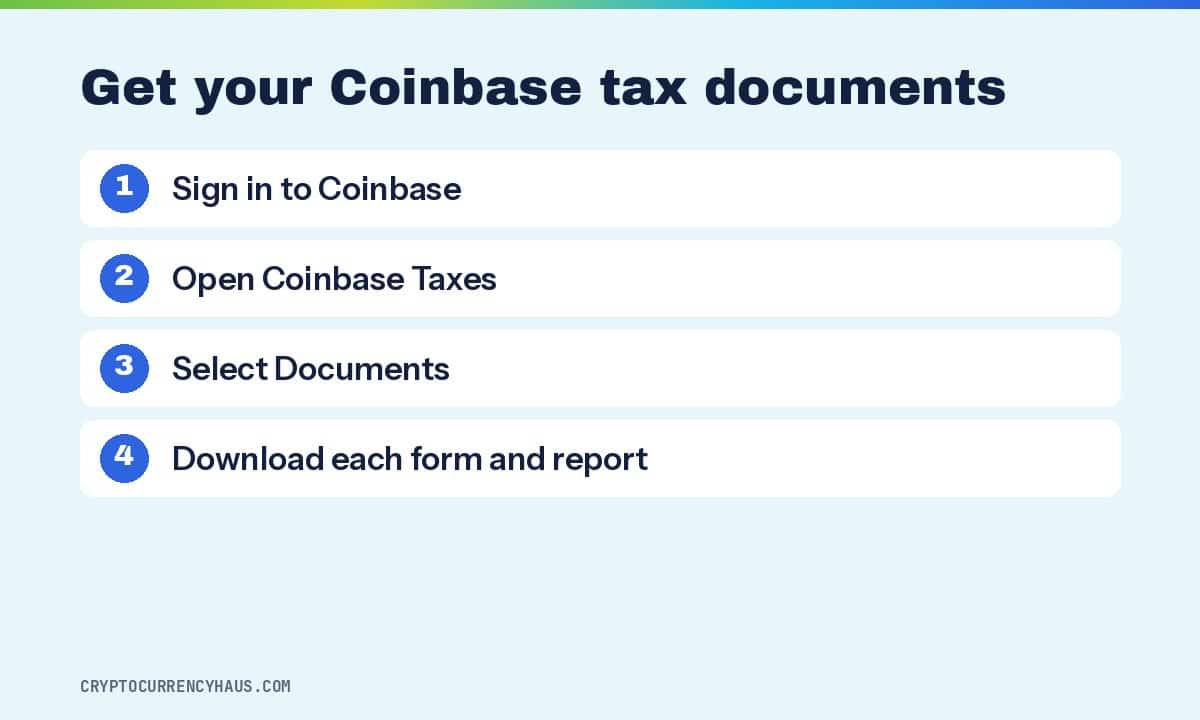
Everything tax-related sits in one area of your account called Coinbase Taxes. Coinbase’s own help center gives the path in three steps, and it works the same on the website and in the app.
- Sign in to Coinbase on coinbase.com or in the Coinbase app. Use the website if you can: the files are CSVs and PDFs, and they’re far easier to open on a computer.
- Open Coinbase Taxes. In the app it sits in your account menu under Taxes. On the website, look for Taxes in the main menu or your profile menu.
- Select Documents and download each file. Your IRS forms appear here once they’re issued, alongside the reports you can generate any time of year.
If a form won’t download, Coinbase’s tip is boring but right: check that your browser allows pop-up downloads from coinbase.com, then try again. Forms stay in Documents after tax season, so you can come back for them later.
Which Coinbase tax documents will I get?
Two kinds of files show up in Documents, and the difference matters. IRS forms (the 1099s) go to you and to the IRS, and the IRS matches them against your return. Reports are working files Coinbase makes only for you. The IRS never sees them.
| Document | Who gets it | What it shows |
|---|---|---|
| Form 1099-DA (IRS form) | US customers who sold or swapped crypto | Proceeds of each sale. For 2026, also cost basis on covered coins |
| Form 1099-MISC (IRS form) | US customers with $2,000+ of 2026 rewards | Staking, USDC rewards and other income paid in crypto |
| Form 1099-B (IRS form) | US customers who traded futures | Futures and similar contracts |
| Gain/loss report | Everyone | Coinbase’s own math on each gain or loss |
| Transaction history | Everyone | Every buy, sell, send, receive and reward |
Two forms you won’t find. Coinbase doesn’t issue Form 1099-K for normal trading anymore, so older guides that mention it are out of date. And from tax year 2025 on, Coinbase no longer offers Form 8949 in its retail Tax Center. Its help page sends people who want one to its crypto tax software partners instead.
Form 1099-DA: your sales and swaps
This is the big one. Every time you sold crypto for dollars or traded one coin for another on Coinbase, it lands here. Swapping Bitcoin for Ether counts as a sale, because the IRS treats crypto as property.
For the 2025 tax year, the form showed proceeds only. For 2026, Coinbase says it will also show cost basis (what you paid) for coins that are “covered.” Our Form 1099-DA explained guide walks through the form box by box.
Form 1099-MISC: rewards and other income
Staking rewards, USDC rewards and some promotions are income. Coinbase sends a 1099-MISC when they add up to the IRS reporting threshold, which rose from $600 for 2025 to $2,000 for 2026 and later. Several popular guides still quote $600 for this year. That’s last year’s number.
The threshold only decides whether you get a form. Rewards below it are still taxable income, which our guide on whether staking rewards are taxed explains with real numbers.
The gain/loss report and transaction history
The gain/loss report is Coinbase’s roundup of every transaction that created a capital gain or loss. You generate it yourself in Coinbase Taxes by picking a report type and date range. It’s useful for checking the 1099-DA, and it includes trades you made through Coinbase’s DEX trading feature, which never appear on an IRS form.
Transaction history is the raw record. Coinbase lets you download account statements as HTML, PDF or CSV, going back to when you opened the account. Download every year you’ve had activity, not just 2026. The price you paid for a coin you sold this year often sits in an older year’s history.
When will Coinbase send my 2026 tax forms?
Coinbase’s help center commits to providing both the tax year 2026 Form 1099-DA and Form 1099-MISC no later than mid-February 2027, with an email when each is ready to download. The IRS deadline for brokers to furnish 2026 Forms 1099-DA is February 16, 2027 (February 15 is Presidents’ Day that year).
One timing trap: Coinbase uses Eastern Time for tax reporting. A trade made after midnight Eastern on January 1, 2027 goes on your 2027 form, even if it was still December 31 where you live. If you’re on the West Coast and planning a year-end sale, finish it before 9 p.m. Pacific on December 31.
Don’t file before the forms arrive if you sold anything. The IRS gets a copy, and a return that doesn’t match it is the most common reason for a letter.
Which Coinbase documents do you actually need?
It depends on what you did this year. Find the line that sounds like you. If more than one fits, you need everything on each line.
- You only bought and held: no 1099-DA, because buying with dollars isn’t a taxable event. You still answer the digital asset question on Form 1040 (buying with cash alone means you can check “No”), and you should download your transaction history to keep your purchase prices.
- You sold coins you bought on Coinbase in 2026: the 1099-DA should show both proceeds and basis. Check it against your gain/loss report and you may be close to done.
- You sold coins you bought before 2026: the 1099-DA will show proceeds but usually no basis, because older purchases are “noncovered.” Your gain/loss report and transaction history fill the gap.
- You moved coins into Coinbase from another exchange or wallet: Coinbase doesn’t know what you paid, so those sales show proceeds with no basis. You’ll need the purchase records from the other platform.
- You earned staking or USDC rewards: look for a 1099-MISC if they reached $2,000. Either way, use the transaction history to total the dollar value of every reward.
- You used Coinbase Wallet or a DEX: none of it is on Coinbase’s IRS forms. Coinbase Taxes covers Coinbase.com accounts, not the self-custody Coinbase Wallet, so you’ll export that history separately.
Why does my Coinbase 1099-DA look wrong?
Usually it isn’t wrong. It’s incomplete, and the IRS designed it that way. Three things trip people up.
Proceeds look huge. Gross proceeds add up every sale and swap, so someone who traded the same $1,000 back and forth twenty times can see $20,000 of proceeds. That’s not profit. Your gain is proceeds minus what you paid.
Cost basis is blank. Under the 2026 IRS instructions for Form 1099-DA, a coin bought before 2026 or transferred in to the broker is a “noncovered” asset, and the broker doesn’t have to report its basis. Coinbase follows that rule. Basis shows only for coins bought on Coinbase on or after January 1, 2026 and kept there until you sold.
A trade is in the “wrong” year. That’s the Eastern Time cutoff again. Compare the form with your transaction history using Eastern dates before you assume an error.
A blank basis doesn’t mean your basis is zero. Report the proceeds exactly as the form shows them and enter your real cost from your own records. If you skip that step, you’ll be taxed on the whole sale price.
What if my name, SSN or state is wrong?
Contact Coinbase support and ask for a correction. Be aware of one limit Coinbase states plainly: it can issue a corrected 1099-DA for a change in state residency, but not for other address changes. That’s one more reason to check your details before December 31 (see the checklist below).
How do Coinbase tax documents go on your tax return?
Each document feeds a specific place on your federal return. Since Coinbase no longer hands you a finished Form 8949, here’s the map.
- Answer the digital asset question on page 1 of Form 1040. If you sold, swapped or earned crypto, the answer is “Yes.”
- Put 1099-DA sales on Form 8949. Crypto uses boxes G to L. Sales where the 1099-DA shows basis go in box G (short-term) or J (long-term). Sales where it shows no basis go in box H or K, with your own cost in column (e).
- Add sales with no form at all, such as Coinbase Wallet swaps or DEX trades, in box I or L from your own records.
- Carry the Form 8949 totals to Schedule D.
- Report rewards as income on Schedule 1, whether or not you got a 1099-MISC.
Our step-by-step guide to how to report crypto on taxes covers every column with a worked example. If you have more than a handful of sales, tax software is faster and less error-prone than filling the form by hand; see our picks for the best crypto tax software.
What to do before December 31
Most Coinbase tax headaches start in January, when it’s too late to fix the cause. Ten minutes now saves a lot of that.
- Check your tax profile. Coinbase accepts taxpayer details only through its digital Form W-9, in Tax settings. The name must match Social Security or IRS records exactly, suffixes included. A mismatch can lead to backup withholding.
- Confirm your state of residence is right on the account, since that’s the one change Coinbase can correct on a 1099-DA afterward.
- Download your transaction history for every year you’ve had the account, and save it somewhere outside Coinbase.
- Write down the cost of every coin you moved in from another exchange or wallet: date bought, price paid, fees. Coinbase can’t report it for you.
- Look at your losses. Selling a coin that’s down before December 31 can offset gains. Our guide to crypto tax-loss harvesting explains how, and the risks.
One safety note. Scammers send fake “IRS” and “Coinbase tax” emails every season. Coinbase emails you when a form is ready, but you should always open the app or type coinbase.com yourself rather than clicking a link, and never share your password or two-factor codes. Our guide to Bitcoin scams shows what these look like.
The bottom line
Your Coinbase tax documents are in Coinbase Taxes under Documents, and the 2026 forms arrive by mid-February 2027. What you do with them depends on your year.
- Coinbase only, all coins bought there in 2026: the 1099-DA plus a tax app or the Form 8949 instructions will get most people there.
- Older coins, or coins moved in: expect blank basis. Use crypto tax software that connects to Coinbase and your other accounts, or hand your transaction history to a preparer.
- Coinbase Wallet, DEX trades, many wallets, or a business: software plus a CPA or enrolled agent who handles crypto. The Coinbase forms will only cover part of your year.
For most Coinbase users, we’d start with CoinTracker: it connects to Coinbase with a read-only key and builds the Form 8949 that Coinbase stopped providing. If you also use several other exchanges and wallets, Koinly is the stronger pick. Both let you import and preview for free and charge only when you download tax reports.
CoinTracker: turns Coinbase history into Form 8949
- Connects to Coinbase with a read-only API key
- Carries basis across when you connect both accounts
- Exports Form 8949 and Schedule D on paid plans
Free to connect and preview. Paid plans to download tax forms. Affiliate link.

Koinly: one report across exchanges and wallets
- Imports Coinbase, Coinbase Wallet and hundreds of other sources
- Matches transfers so coins moved in keep their basis
- Previews your gains free before you pay
Free to import and preview. You pay to download tax reports. Affiliate link.
Frequently asked questions
Does Coinbase send tax forms to the IRS?
Yes. Coinbase files a copy of each Form 1099-DA, 1099-MISC and 1099-B it sends you with the IRS. The gain/loss report and transaction history are for you only.
Do I have to report crypto if I didn’t get a 1099 from Coinbase?
Yes. The IRS requires you to report taxable crypto sales and income whether or not a form was issued. A missing form usually means your rewards were under $2,000 or you made no sales on Coinbase.
Does Coinbase give you Form 8949?
Not anymore. From tax year 2025, Coinbase removed Form 8949 from its retail Tax Center and points customers to crypto tax software partners. You can also fill it in yourself from the 1099-DA and your records.
Does Coinbase Wallet send a 1099?
No. Coinbase Wallet is a self-custody wallet, and Coinbase Taxes covers only Coinbase.com accounts. Swaps and sales in the wallet are still reportable, so export its history separately.
Why is the cost basis missing on my Coinbase 1099-DA?
Coins bought before January 1, 2026, or moved in from another platform, are noncovered, so Coinbase reports only the proceeds. Enter your real cost on Form 8949 from your own records.
Can I get Coinbase tax documents for past years?
Yes. Issued forms stay in Coinbase Taxes under Documents, and you can download account statements back to when you opened the account. Coinbase Pro history isn’t in Coinbase Taxes; look for it in your account statements.
How we researched this guide
On November 11, 2026 we read Coinbase’s Help Center pages on tax documents, Form 1099-DA, Form 8949, Form W-9, rewards and account statements, and the 2026 IRS instructions for Forms 1099-DA, 1099-MISC and 8949. Then we read the top-ranking guides on Coinbase tax documents and checked them against those sources. Several still list the old $600 threshold for 2026 rewards, and one still says Coinbase issues Form 1099-K. We haven’t used Coinbase Taxes ourselves for this guide, so the steps follow Coinbase’s published instructions. Partners can’t pay for our rankings. Read our review process.
Sources
- Coinbase Help: Download your tax reports (Coinbase Taxes, Documents; checked November 2026)
- Coinbase Help: Taxes for US customers (forms by activity, Coinbase Wallet and Pro not included; checked November 2026)
- Coinbase Help: IRS Form 1099-DA (mid-February 2027, covered and noncovered, Eastern Time, corrections; checked November 2026)
- Coinbase Help: Form 8949 (no longer in the retail Tax Center from tax year 2025; checked November 2026)
- Coinbase Help: USDC rewards overview ($600 for 2025, $2,000 for 2026 and later; checked November 2026)
- Coinbase Help: IRS Form W-9 (digital W-9, Tax settings; checked November 2026)
- Coinbase Help: Account statements and gain/loss report (checked November 2026)
- IRS: 2026 Instructions for Form 1099-DA (noncovered securities; checked November 2026)
- IRS: Instructions for Forms 1099-MISC and 1099-NEC (Rev. December 2026) ($2,000 threshold; checked November 2026)
- IRS: Instructions for Form 8949 (boxes G to L for digital assets; checked November 2026)
- IRS: Digital assets (Form 1040 question, reporting without a form; checked November 2026)